
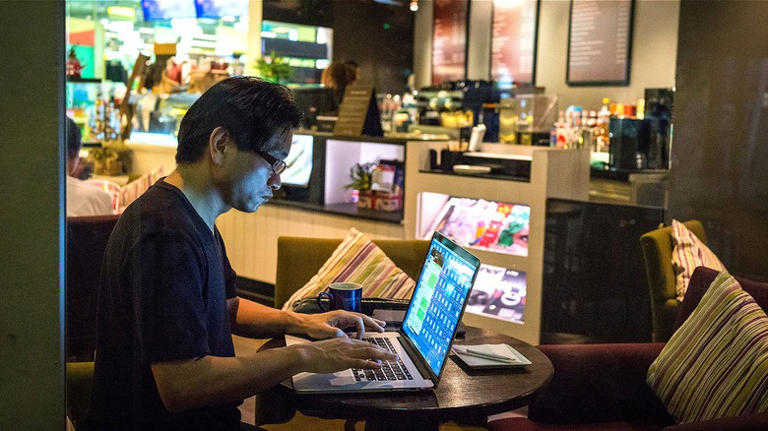
It was a chilly Tuesday morning in downtown Chicago when Jason Miller, a freelance graphic designer, walked into his favorite coffee shop to start the day. He ordered a caramel latte, found a cozy seat by the window, and opened his laptop.
Like most Americans, Jason connected to the café’s free Wi-Fi without a second thought. The connection was fast, smooth, and—best of all—free. He started checking emails, opened his online banking app to review a payment from a client, and even made a quick transfer between accounts.
Life felt efficient. Productive. Normal.
Until a week later, when his bank account was nearly wiped clean.
At first, Jason thought it was a glitch. But after hours on the phone with customer service, the truth emerged: a hacker had intercepted his data while he was on that “free public Wi-Fi.”
He had unknowingly logged into a fake hotspot—a clone network set up by a cybercriminal sitting just two tables away.
The coffee had cost him $6. The Wi-Fi? Thousands.
☕ The Hidden Cost of “Free” Wi-Fi
Across the United States, more than 80% of adults use public Wi-Fi at least once a month. Airports, coffee shops, hotels, libraries, universities, and even city parks now offer open connections as a convenience.
But here’s the hard truth: “free” Wi-Fi is anything but free.
Public networks are playgrounds for hackers. They thrive on your trust, your hurry, and your habit of checking that little Wi-Fi icon before your data plan.
Dr. Lauren Hines, a cybersecurity analyst based in San Francisco, explains:
“Most Americans don’t realize how easy it is for hackers to intercept unencrypted data. Logging into your bank account on public Wi-Fi is like shouting your password across a crowded room — you just can’t see who’s listening.”
🧠 How Hackers Steal Your Data (And Why It’s Easier Than You Think)
Let’s peel back the curtain for a moment. You might think hacking requires fancy code or Hollywood-level tech skills. But in reality, all it takes is a cheap laptop and some free software.
Here’s how cybercriminals use public Wi-Fi to attack:
1. Man-in-the-Middle Attacks
Imagine you’re sending a message to your bank. Normally, that message travels securely between your device and the bank’s server.
But on a public network, a hacker can position themselves “in the middle,” secretly intercepting your traffic.
You think you’re logging into your Chase or Wells Fargo account—but the hacker sees everything: your username, password, and even your balance.
2. Fake Hotspots
A hacker sets up a network named “Starbucks_Free_WiFi” or “Airport_Guest.”
It looks identical to the official one. The moment you connect, all your online activity runs through their server.
It’s like giving your house keys to a stranger because they looked like your neighbor.
3. Packet Sniffing
Sounds funny, but it’s no joke. “Sniffing” tools allow hackers to capture the data packets your device sends and receives. Even if you’re not visiting shady websites, your browsing history, email addresses, and session tokens can be exposed.
4. Malware Injection
Once connected, hackers can push malicious code to your device. Sometimes it’s ransomware that locks your files; other times it’s spyware silently logging every keystroke.
5. Session Hijacking
Ever logged into your PayPal or Amazon account and clicked “Remember me”?
Hackers can hijack that “session cookie,” letting them access your account without needing your password.
💸 The Financial Fallout
The scariest part? You might not even realize what’s happening until it’s too late.
When your financial data is stolen, the consequences can cascade:
-
Unauthorized bank transfers within minutes.
-
Credit card fraud leading to debt collection calls.
-
Identity theft that can ruin your credit score.
-
Tax return scams, where thieves file in your name.
-
Crypto wallet theft (for those who invest online).
Jason, our Chicago designer, learned that the hard way. The hacker used his banking info to set up a fake Venmo account, siphoning $5,000 before the fraud alert kicked in.
It took him six months to recover most of it—and even longer to rebuild his sense of digital safety.
📊 Why Americans Are Especially at Risk
Public Wi-Fi is woven into modern U.S. culture. From bustling Starbucks locations in New York to airport lounges in Dallas, Americans practically live online. But this convenience culture makes the U.S. a prime target for cybercrime.
Here’s why:
-
High connectivity: Americans own more connected devices per capita than any other country.
-
Remote work surge: Millions now work from cafés, co-working spaces, and airports.
-
Digital banking boom: Over 90% of U.S. adults manage finances via apps or online accounts.
-
Complacency: Many users trust Wi-Fi networks that “look official” without verifying their authenticity.
In short — hackers go where the money and opportunity are. And America’s always online, always-connected lifestyle makes it irresistible.
🔍 Real-World Story: The Hacker at the Airport
Picture this: LAX airport, 7 a.m. Hundreds of travelers waiting for flights, sipping coffee, scrolling through emails.
In one corner, a man with a laptop opens a small device—a Wi-Fi Pineapple. Within seconds, it clones the official “LAX-Free-WiFi” network. Travelers see two options with nearly identical names. Most pick the fake one.
He sits back and smiles as notifications roll in: Gmail logins, corporate credentials, online purchases.
By the time his flight boards, he’s stolen thousands of data points. The victims? None the wiser.
This isn’t science fiction. It happens every single day in airports across the United States.
🧱 How to Protect Yourself: The Cybersecurity Playbook for Public Wi-Fi
The good news? You can still enjoy public Wi-Fi safely — if you take a few smart precautions. Dr. Hines calls it the “Digital Defense Rule of 5.”
1. Use a VPN (Virtual Private Network)
A VPN encrypts your internet traffic, making it unreadable to hackers. Even if someone intercepts your data, it’s just gibberish.
Think of it as traveling through a private tunnel while everyone else is stuck in traffic.
Choose a U.S.-based VPN with a no-logs policy, fast servers, and strong encryption.
2. Turn Off Auto-Connect
Many devices automatically connect to “familiar” networks.
Turn this off. Always manually select the Wi-Fi network and verify its name with staff before connecting.
3. Avoid Sensitive Transactions
Never log into your bank, credit card, or PayPal accounts while on public Wi-Fi.
If you must, use your mobile data instead of Wi-Fi. Cellular networks are much harder to hack.
4. Enable Two-Factor Authentication (2FA)
Even if your password is stolen, 2FA adds an extra layer of security — usually a text code or authentication app.
5. Forget the Network After Use
Once you’re done, disconnect and make your device “forget” the network.
That prevents automatic reconnections in the future, especially if someone tries to mimic that same Wi-Fi name again.
💡 Bonus Tips for the Cyber-Savvy American
-
Use HTTPS websites only. Look for the padlock icon in your browser before entering personal info.
-
Keep your system updated. Hackers often exploit outdated software or browser versions.
-
Turn on your firewall. It’s a simple line of defense that filters out malicious traffic.
-
Watch for sudden disconnections. If you’re forced to reconnect frequently, it could be a hacker manipulating your session.
-
Avoid sharing files or enabling Bluetooth while on public Wi-Fi.
And yes — even your smartphone is vulnerable. Public Wi-Fi doesn’t discriminate between laptops and iPhones.
🕵️ The Dark Economy Behind Your Data
What happens to your stolen data?
It doesn’t just vanish. It enters a digital black market — a hidden online economy where personal information is sold like merchandise.
-
Bank logins can sell for $100–$1,000 each.
-
Credit card details fetch $20–$50 per card.
-
Social Security numbers can be used to open fake accounts.
-
Hacked emails are used to send phishing scams to your contacts.
Cybercriminals often operate in organized groups, reselling data worldwide. So even if a hacker in Los Angeles steals your info, it could end up in the hands of someone in Eastern Europe or Asia within hours.
🧍♀️ The Human Side: Anxiety, Distrust, and Digital Fatigue
The financial hit is bad enough, but the emotional toll runs deep. Victims often describe feeling:
-
Violated and paranoid
-
Afraid to use technology
-
Constantly checking accounts and passwords
One mother from Florida, who lost $3,200 to a Wi-Fi scam, said:
“I used to love working from coffee shops. Now, every time I open my laptop in public, my hands shake.”
Digital safety isn’t just about protecting your money — it’s about protecting your peace of mind.
🇺🇸 The Bigger Picture: America’s Public Wi-Fi Problem
Despite the growing risk, many U.S. cities continue expanding free Wi-Fi networks — from airports to public parks — without robust encryption or user education.
Experts argue that the U.S. needs a national cybersecurity awareness initiative, much like seatbelt campaigns decades ago. Americans learned to buckle up to save lives; now they must learn to secure up to save their data.
Employers, too, should play a role. With remote and hybrid work here to stay, companies must train employees to recognize unsafe connections and provide tools like corporate VPNs.
🏙️ A Glimpse of the Future: Secure Public Networks?
There’s hope on the horizon. Newer technologies, like encrypted Wi-Fi 6E networks and AI-based threat detection, promise safer connections in public spaces.
Some U.S. coffee chains and airports are experimenting with user verification systems, where guests sign in with secure tokens instead of open access.
But until that becomes the norm, the best protection will always be personal vigilance.
💬 Jason’s Redemption Arc
Months after his financial disaster, Jason rebuilt his digital life. He learned how to use a VPN, switched banks, froze his credit, and became something of a cybersecurity evangelist in his coworking community.
He laughs now, saying,
“That $5,000 lesson was the most expensive Wi-Fi bill I’ve ever paid — but at least I’ll never make the same mistake again.”
His story echoes what many Americans are realizing:
The most dangerous thing about public Wi-Fi isn’t the connection itself.
It’s trusting it blindly.
✅ The Bottom Line
Public Wi-Fi is convenient — but it’s also a trap waiting for the careless.
Your bank accounts, your credit cards, your digital identity — all can be compromised in seconds if you’re not cautious.
So next time you sit in a café, airport, or hotel lobby and see that tempting “Free Wi-Fi” signal, pause and ask yourself:
“Is this connection really worth my peace of mind?”
Because in the digital age, safety isn’t just about locking your front door — it’s about locking your data.
❓ Frequently Asked Questions
Q1: Is it ever safe to use public Wi-Fi?
Yes, but only if you use a VPN, avoid sensitive transactions, and connect to verified networks. Treat it as convenience, not as a secure connection.
Q2: Can someone really hack me just by sharing the same Wi-Fi?
Absolutely. Hackers can intercept unencrypted data or mimic networks to steal credentials without you realizing it.
Q3: What should I do if I suspect my data was compromised?
Immediately change your passwords, contact your bank, and freeze your credit. Consider running a malware scan on your device.
Q4: Are hotel or airplane Wi-Fi networks safe?
Not necessarily. They’re often shared by hundreds of users and rarely encrypted properly. Use a VPN or stick to your mobile hotspot when handling sensitive information.
Q5: Should I use mobile hotspots instead?
Yes. Your personal phone hotspot is much safer than any public Wi-Fi, since it uses encrypted cellular data.
Q6: What’s the single best protection method?
A trusted VPN, combined with two-factor authentication and strong password hygiene.
In short:
Free Wi-Fi might make your day easier — but it could also make your wallet emptier.
So stay smart, stay secure, and remember: in the digital age, awareness is your best firewall. 🔒💻